
Download VirtualFiles – Smart File Organization Tool for Windows, Mac, and Mobile
VirtualFiles is a powerful, free file management utility developed by Grandutils.com, designed to revolutionize how users organize and access their digital files. Whether you're managing thousands of photos, documents, or videos, VirtualFiles offers a smart solution by creating virtual twins of your original files—ensuring your data stays secure while improving accessibility. This innovative tool works by storing your files in an independent virtual environment, allowing you to sort, tag, and search without altering the original file locations.
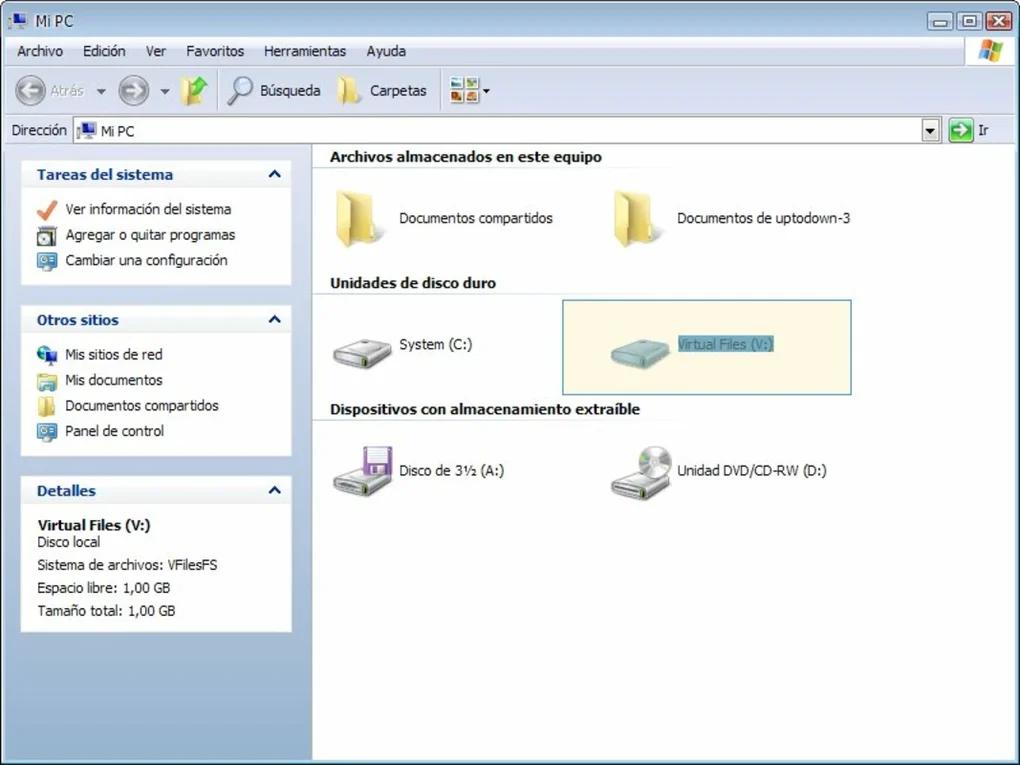
Perfect for users with large hard drives or cluttered desktops, VirtualFiles acts like a virtual hard drive that enhances productivity without slowing down your system. With support for Windows, Mac, and mobile platforms, it’s ideal for anyone looking to streamline their digital workspace. Download VirtualFiles today and experience a smarter way to manage your files—secure, fast, and hassle-free.
Introducing VirtualFiles: A Smart Approach to File Organization
Traditional file management often leads to cluttered folders, duplicated files, and lost documents—especially when dealing with large volumes of data. VirtualFiles steps in to solve these common pain points with a unique virtualization technique that redefines how we interact with digital files. Instead of moving or copying files into new folders, VirtualFiles creates virtual "twins" of your original files.
These twins are lightweight pointers that link back to the source, meaning your original files remain untouched and secure. This approach ensures that your hard drive isn’t bloated with duplicates, and your files are always backed up in their original location. The result?
Faster access, better organization, and zero risk of accidental deletion or corruption.
One of the standout features of VirtualFiles is its intelligent tagging system. You can assign custom tags to files—such as “Work,” “Vacation,” or “Important”—and instantly filter or search for them across your entire library. This is especially useful for professionals, students, and content creators who juggle multiple projects.
The software also supports metadata extraction, so photos and documents automatically include details like creation date, file size, and location. With a clean, intuitive interface, VirtualFiles integrates seamlessly into your daily workflow. Whether you're a casual user or a power user managing terabytes of data, this tool simplifies the chaos and brings order to your digital life.
Best of all, it’s completely free to download and use, making it one of the most accessible file management tools available today.
Another major advantage is performance. Unlike traditional file managers that slow down as your library grows, VirtualFiles maintains optimal speed by working with virtual references instead of physical copies. This means no lag, no delays, and no need to upgrade your hardware just to manage your files better.
The software runs efficiently in the background, consuming minimal system resources. For users on older machines or those with limited storage, this is a game-changer. Plus, regular updates ensure that VirtualFiles stays compatible with the latest Windows and Mac operating systems, bringing new features and security improvements with every release.
With VirtualFiles, file management isn’t just easier—it’s smarter, faster, and future-proof.
Key Features That Make VirtualFiles a Must-Have Tool
VirtualFiles isn’t just another file organizer—it’s a comprehensive digital workspace enhancer packed with powerful features tailored for modern users. One of its most innovative features is the Virtual Twin Technology. By creating lightweight virtual copies of your files, it allows you to organize documents, images, and videos without duplicating data. This means you can move a photo into a “Family” folder or a report into a “Project 2024” category, and it will appear in your virtual library—while the original file remains safely stored in its original location.
Another standout feature is the Smart Tagging & Search System. You can assign multiple tags to a single file, such as “Invoice,” “Client A,” and “Pending.” Then, simply search using any combination of tags to instantly locate the file. This is far more efficient than browsing through nested folders. The search function is lightning-fast, even with tens of thousands of files, thanks to an optimized indexing engine that runs in the background.
VirtualFiles also includes Cloud Sync Integration, allowing you to link your Dropbox, Google Drive, or OneDrive accounts. Your virtual files can be synced across devices, so you can access your organized library from your laptop, tablet, or smartphone. The Batch Processing tool lets you apply tags, rename, or move multiple files at once, saving hours of manual work. For those who value privacy, the Secure Vault feature encrypts sensitive files with AES-256 encryption, protecting them from unauthorized access.
- Virtual Twin Technology – Create virtual copies without duplicating data
- Smart Tagging & Advanced Search – Find files in seconds using custom tags
- Cloud Sync Integration – Sync your virtual library across devices
- Batch Processing – Apply changes to multiple files at once
- Secure Vault – Encrypt sensitive files with military-grade encryption
- Low System Resource Usage – Runs smoothly even on older machines
- Regular Free Updates – New features and security patches delivered automatically
Easy Installation & Seamless Usage Across Platforms
Getting started with VirtualFiles is a breeze, whether you're on Windows, Mac, or mobile. The software is available for free download from the official Grandutils.com website. After downloading the installer, simply run it and follow the on-screen prompts—no technical expertise required. The installation process takes less than a minute, and the app launches automatically once set up. During setup, you’ll be prompted to choose your default file storage location and sync preferences, making it easy to tailor the experience to your needs.
Once installed, VirtualFiles runs quietly in the background, showing only a small icon in your system tray. You can access the full interface by clicking the icon or using a customizable keyboard shortcut. The dashboard presents your virtual library in a clean, folder-like structure, but with the added power of tags, filters, and search. You can drag and drop files into virtual folders, right-click to apply tags, or use the built-in search bar to find anything instantly. The tool also supports drag-and-drop from other apps, making it easy to add files from your browser, email, or photo editor.
For users on mobile, VirtualFiles offers dedicated apps for both Android and iOS. These apps sync with your desktop version, so your virtual library is always up to date. You can browse, tag, and search files on the go, making it ideal for remote workers or students who need access to their documents from anywhere. The mobile interface is touch-optimized and runs smoothly, even on older smartphones. Whether you’re at home, in the office, or on a train, VirtualFiles keeps your files organized and accessible—no matter where you are.
Compatibility & System Requirements
VirtualFiles is designed to work across a wide range of devices and operating systems, ensuring broad accessibility for all users. It is fully compatible with Windows 10 and 11, including both 64-bit and 32-bit versions. For Mac users, the software supports macOS 11 Big Sur and later, including Apple Silicon (M1/M2) chips, making it ideal for modern Apple devices. The mobile apps are available for Android 8.0 and above, as well as iOS 14 and later, ensuring compatibility with most smartphones and tablets on the market.
System requirements are modest, making VirtualFiles suitable for both high-end workstations and older machines. The minimum specs include a 1 GHz processor, 1 GB RAM (2 GB recommended), and 100 MB of free disk space. The software does not require a dedicated graphics card and runs efficiently on integrated graphics. It also supports external drives, USB storage, and network-attached storage (NAS), allowing you to manage files from multiple sources in one unified virtual space.
Additionally, VirtualFiles supports all major file types, including documents (PDF, DOCX, XLSX), images (JPEG, PNG, RAW), videos (MP4, AVI, MOV), and audio files (MP3, WAV). This versatility makes it an excellent choice for users across various industries—from photographers and designers to business professionals and students. With its cross-platform sync and universal file support, VirtualFiles truly delivers a seamless experience no matter how you access your files.
Pros and Cons: Is VirtualFiles Right for You?
- Pros:
- Creates virtual twins—no file duplication, zero performance loss
- Smart tagging and instant search for lightning-fast file retrieval
- Free to download and use with regular updates
- Supports Windows, Mac, Android, and iOS
- Low system resource usage—ideal for older devices
- Secure Vault with AES-256 encryption for sensitive files
- Cloud sync integration for cross-device access
- Cons:
- Advanced features require a premium subscription (available via optional upgrade)
- Mobile app lacks some desktop-level customization
- Initial setup may require time to organize existing files
- Not a file recovery tool—does not restore deleted files
- Limited third-party plugin support
Frequently Asked Questions (FAQ)
Is VirtualFiles free to download and use?
Yes, VirtualFiles is completely free to download and use. The core features—including virtual twins, tagging, search, and basic cloud sync—are available at no cost. While advanced features like automated backups and priority support are available through a premium subscription, the free version offers robust functionality for most users.
Can I use VirtualFiles with my existing file structure?
Absolutely. VirtualFiles doesn’t require you to move or reorganize your original files. It works by creating virtual references to your existing files, so your current folder structure remains intact. You can organize your files in VirtualFiles without touching the originals—perfect for users who want to avoid data loss or confusion.
Does VirtualFiles slow down my computer?
No, VirtualFiles is designed for minimal system impact. It uses virtual references instead of physical copies, which reduces storage usage and prevents performance degradation. The software runs efficiently in the background and consumes very little CPU or RAM, even with large file libraries.
Can I sync my virtual files across devices?
Yes, VirtualFiles supports cloud sync with popular services like Dropbox, Google Drive, and OneDrive. Your virtual library is automatically synced across your Windows, Mac, Android, and iOS devices, so you can access your organized files from anywhere.
What happens if I delete a file from VirtualFiles?
Deleting a file from VirtualFiles only removes the virtual reference. The original file remains untouched in its original location. If you want to permanently delete the file, you must do so directly from the source folder. This ensures your data stays secure and prevents accidental loss.
Final Verdict: A Must-Download for Organized Digital Life
VirtualFiles is more than just a file manager—it’s a game-changer for anyone tired of cluttered desktops and endless folder dives. With its innovative virtual twin technology, smart tagging, and cross-platform sync, it offers a secure, fast, and intuitive way to organize your digital life. Whether you're a student managing research papers, a professional handling client files, or a creative storing thousands of photos, VirtualFiles streamlines your workflow without slowing you down.
Best of all, it’s completely free to download and use, with regular updates ensuring long-term reliability. The only minor drawbacks are the limited advanced features in the free version and a slight learning curve for organizing existing files. But for most users, the benefits far outweigh these small limitations.
Download VirtualFiles today and take control of your digital chaos—secure, fast, and free.







